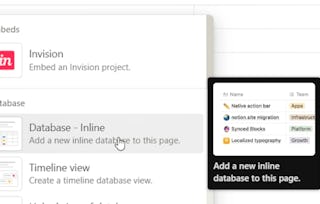
Ready to build your dream workspace in Notion? Join instructor Kristine Sacdalan in this beginner-friendly course that walks you through the essential building blocks of Notion so you can start organizing your personal and professional life with confidence.

Notion for Beginners: Master the Core Features

位教师:Skillshare
访问权限由 Coursera Learning Team 提供
2,424 人已注册
您将获得的技能
您将学习的工具
要了解的详细信息

添加到您的领英档案
6 项作业
了解顶级公司的员工如何掌握热门技能

积累特定领域的专业知识
- 向行业专家学习新概念
- 获得对主题或工具的基础理解
- 通过实践项目培养工作相关技能
- 获得可共享的职业证书

该课程共有6个模块
Begin your Notion journey by setting up your personal account and exploring the platform’s core interface and functionality. This module introduces the course project and familiarizes you with the Notion workspace, preparing you to use Notion as a central hub for your personal or professional organization. You'll gain confidence navigating the app and understanding its building blocks.
涵盖的内容
4个视频1篇阅读材料1个作业1个讨论话题
Learn how to use Notion's foundational blocks to build structured and useful pages. In this module, you’ll explore how to add and format essential elements like text, pages, to-do lists, headings, and tables. You’ll also discover how to select the right blocks for various types of content to improve clarity and usability across your workspaces.
涵盖的内容
5个视频1个作业1个讨论话题
Organize your ideas with precision using Notion’s list-based and formatting tools. This module covers how to use lists, toggle lists, quotes, dividers, callouts, and page links to streamline your layout and enhance your page organization. You'll learn how to choose the best organizational block for different content types and goals.
涵盖的内容
6个视频1个作业1个讨论话题
Enhance your Notion pages with interactive and dynamic features. This module walks you through advanced tools like synced blocks, buttons, tables of contents, and equations. You’ll also create multi-column layouts to better display content and improve workflow, taking your Notion skills to the next level.
涵盖的内容
5个视频1个作业1个讨论话题
Design clean and intuitive Notion pages using smart layout and navigation tools. In this module, you’ll work with breadcrumbs, toggle headings, and the Code-Mermaid block to build technically expressive and easily navigable pages. These features help ensure your pages remain both functional and user-friendly as they grow.
涵盖的内容
3个视频1个作业1个讨论话题
Create visually rich and engaging Notion pages by embedding media and uploading files. This final module teaches you how to integrate images, videos, audio, bookmarks, and documents directly into your workspace. You’ll apply all the skills you've developed to complete a multimedia course project that showcases your mastery of Notion.
涵盖的内容
4个视频1个作业1次同伴评审
获得职业证书
将此证书添加到您的 LinkedIn 个人资料、简历或履历中。在社交媒体和绩效考核中分享。
位教师

提供方
人们为什么选择 Coursera 来帮助自己实现职业发展

Felipe M.

Jennifer J.

Larry W.