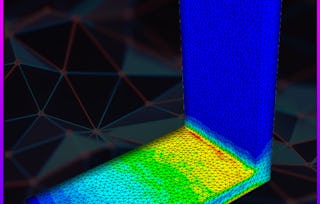
In this hands-on project, you will learn about the Finite Element Method (FEM) and perform a linear & nonlinear static analysis study using the cloud-based simulation tool SimScale. We will set up simulation cases with provided geometries to learn the fundamentals of the Finite Element Method and how a static linear and nonlinear analysis is approached in the first place. We will walk through the classical three step process of every simulation which includes the pre-processing, processing and post-processing step.

FEM - Linear, Nonlinear Analysis & Post-Processing
Économisez sur les compétences qui vous font briller avec 40 % de réduction sur 3 mois de Coursera Plus. Économisez maintenant

FEM - Linear, Nonlinear Analysis & Post-Processing

Instructeur : Jousef Murad
17 553 déjà inscrits
Inclus avec
Apprendre, pratiquer et appliquer des compétences professionnelles grâce à des conseils d’experts
4.7
(213 avis)
niveau Intermédiaire
Expérience recommandée
1 hour
Apprenez à votre propre rythme
Un apprentissage pratique
Ce que vous apprendrez
Understand cloud-simulation technology and why it is so powerful
How to set up a linear & nonlinear static analysis and post-process the results
Compétences que vous pratiquerez
- Catégorie : 3D Modeling
- Catégorie : Finite Element Methods
- Catégorie : Simulation and Simulation Software
- Catégorie : Structural Engineering
- Catégorie : Structural Analysis
- Catégorie : Mathematical Modeling
- Catégorie : Simulations
- Catégorie : Mechanical Design
- Catégorie : Engineering Analysis
Détails à connaître

Certificat partageable
Ajouter à votre profil LinkedIn
Enseigné en Anglais
Aucun téléchargement ou installation requis(e)
Disponible uniquement sur ordinateur
Découvrez comment les employés des entreprises prestigieuses maîtrisent des compétences recherchées

Apprendre, pratiquer et appliquer des compétences prêtes à l’emploi en moins de 2 heures
- Bénéficiez d’une formation par des experts du secteur
- Gagnez en expérience pratique en effectuant des tâches professionnelles du monde réel
- Renforcez votre confiance en utilisant les outils et technologies les plus récents

À propos de ce Projet Guidé
Apprendrez étape par étape
Votre enseignant(e) vous guidera étape par étape, grâce à une vidéo en écran partagé sur votre espace de travail :
Understand what SimScale is and how the Dashboard is used for simulation
Perform linear & nonlinear analyses
Post-process your results and know how to perform a simple sanity check for your simulation
Mesh your geometries
Run your simulation
Define boundary conditions (BCs) for your model and define other output results
Understand where to upload geometries and how to use existing ones for simulations
Expérience recommandée
Basic knowledge in engineering mechanics
6 images de projet
Instructeur
Évaluations de l’enseignant
(15 évaluations)9 Cours61 766 apprenants
Offert par


Méthode d’apprentissage
Apprentissage pratique basé sur les compétences
Mettez en pratique de nouvelles compétences en effectuant des tâches professionnelles.
Conseils d’experts
Suivez les vidéos pré-enregistrées d’experts à l’aide d’une interface unique, divisée en deux.
Aucun téléchargement ou installation requis(e)
Accédez aux outils et aux ressources dont vous avez besoin dans un espace de travail cloud préconfiguré.
Disponible uniquement sur ordinateur de bureau
Ce Projet Guidé est conçu pour les ordinateurs portables ou de bureau disposant d’une connexion internet fiable, et non pour les appareils mobiles.
Pour quelles raisons les étudiants sur Coursera nous choisissent-ils pour leur carrière ?

Felipe M.
Étudiant(e) depuis 2018
’Pouvoir suivre des cours à mon rythme à été une expérience extraordinaire. Je peux apprendre chaque fois que mon emploi du temps me le permet et en fonction de mon humeur.’

Jennifer J.
Étudiant(e) depuis 2020
’J'ai directement appliqué les concepts et les compétences que j'ai appris de mes cours à un nouveau projet passionnant au travail.’

Larry W.
Étudiant(e) depuis 2021
’Lorsque j'ai besoin de cours sur des sujets que mon université ne propose pas, Coursera est l'un des meilleurs endroits où se rendre.’

Chaitanya A.
’Apprendre, ce n'est pas seulement s'améliorer dans son travail : c'est bien plus que cela. Coursera me permet d'apprendre sans limites.’
Avis des étudiants
- 5 stars
75,11 %
- 4 stars
21,12 %
- 3 stars
0,93 %
- 2 stars
0,46 %
- 1 star
2,34 %
Affichage de 3 sur 213
IA
Révisé le 5 juin 2024
Very well explained and organized, thank you. I learned what I needed
PS
Révisé le 30 août 2023
This is very helpful Hands-on session. I learn a lot about new software i.e. SimScale. I am very thankful to Coursera for this learning opportunity.
HN
Révisé le 1 janv. 2024
It was easy, there were 6 questions for task but I wished if they wanted learners to upload results of a simulation and learn much better
Vous aimerez peut-être aussi
University of Michigan

University of Minnesota
Korea Advanced Institute of Science and Technology(KAIST)