How to Write ChatGPT Prompts: Your 2026 Guide
Discover foundational and advanced prompting strategies to unlock ChatGPT’s power.
![[Featured Image] A person in a white t-shirt sits on the floor at their coffee table and types prompts into ChatGPT for a project.](https://d3njjcbhbojbot.cloudfront.net/api/utilities/v1/imageproxy/https://images.ctfassets.net/wp1lcwdav1p1/5X53IHflVZUrp7nFssMQpd/084fc10de1e62bacac3c41e063647352/GettyImages-1220176746.jpeg?w=1500&h=680&q=60&fit=fill&f=faces&fm=jpg&fl=progressive&auto=format%2Ccompress&dpr=1&w=1000)
Key takeaways
Writing effective prompts for ChatGPT requires applying key strategies to guide the text-to-text generative AI tool to produce the desired outputs.
Writing effective ChatGPT prompts includes providing ChatGPT with the information it needs to produce your desired output, starting with your project’s description and background, and a role for ChatGPT to simulate.
Ensure you also specify what type of output you want, including anything you don’t want ChatGPT to include and examples of your desired output type.
You can also employ some advanced strategies to write better prompts for ChatGPT, including using an AI prompt generator, reverse engineering prompts, and using prompt examples from the internet.
Explore key ChatGPT prompting strategies, including the foundational processes you need for any project and advanced strategies for optimizing the outputs. If you’re ready to start building expertise in prompt engineering, enroll in the Google Prompting Essentials Specialization. You’ll have the opportunity to learn how to write effective multi-modal prompts for generative AI agents in as little as four hours. Upon completion, you’ll have earned a career certificate for your resume.
What is a ChatGPT prompt and why does structure matter?
A ChatGPT prompt is the specific set of instructions, context, and data you provide to the model to elicit a response. Structure matters because LLMs function on pattern recognition and probability; a well-organized prompt prevents logical drift, and ensures the output aligns with your expectations rather than a generic guess.
The best way to structure a ChatGPT prompt
Use a modular approach so you can swap components easily during prompt testing.
Role/Persona: Define who the AI is (e.g., "Act as a senior DevOps engineer").
Task/Goal: State the primary objective clearly (e.g., "Refactor this Python script").
Context/Constraints: Provide background data and strict boundaries (e.g., "Use only standard libraries; do not use external APIs").
Output Specification: Define the format, length, and tone (e.g., "Return a Markdown table and a 2-sentence summary").
How to write ChatGPT prompts
Effective ChatGPT prompts include a few core components that provide the generative AI tool with the information it needs to produce your desired output. Starting with a project in mind, compose each of the following prompt components and then compile them into a single set of instructions (up to around 3,000 words) that ChatGPT will use to generate an output.
1. Project description: an overview of your project & why you’re making this request
2. Role: the perspective you want AI to use
3. Context: bigger picture on what this output will contribute to
4. Specifications: how long you want the response to be & what tone it should use
5. Constraints: May include biases to avoid or potential output that could breach regulations
6. Examples: a sample of what you’re expecting to receive
Here’s a further review of each:
1. Project description
Write one or two sentences that describe your project, its purpose, your intended audience or end users for the final product, and the individual outputs you need ChatGPT to generate in order to complete the project.
Example: Develop a content marketing strategy for a tech startup for the purpose of increasing brand awareness and engaging a niche market of tech enthusiasts. ChatGPT will assist in drafting blog post ideas, captions for social media posts, and email newsletter concepts.
2. ChatGPT’s role
Assign ChatGPT a role, as in an identity, point of view, or profession, to help guide the tool’s responses. ChatGPT can generate outputs based on the area of expertise related to the role you assign it.
Example: ChatGPT will act as a content generator and strategist, helping to generate captivating headlines and viral post ideas, as well as identify opportunities to fill content gaps in this niche.
How to prompt ChatGPT to write like a human: Prompt tip
Remember that ChatGPT can understand and respond to human language because of a technology called natural language processing. When prompting, you can be conversational with ChatGPT. The prompt doesn’t need to be overly formal; it just needs to be clear and specific.

4. Output specifications
Your prompt should specify details of the output you want ChatGPT to generate and how it should be generated, including the tone, length, style, and structure, as well as research that needs to be conducted.
Example: The content strategy should use accessible terms and avoid jargon while still sounding professional so that all project stakeholders can easily understand it. It should start with the strategy objectives and provide specific ideas for content that will appear on multiple marketing channels, along with a short rationale for each suggestion. It should be informed by the content marketing of popular tech brands: Company A, Company B, and Company C.
5. Rules and constraints
Including rules and constraints, alongside the output specifications, can further aid ChatGPT in producing your desired output. These might include certain types of content, examples, or even words you want ChatGPT to exclude.
6. Output examples
Giving ChatGPT some examples of the kind of output you are looking for can reduce the risk of it misinterpreting your prompt. You can include examples of writing styles and tones you’ve specified in the instructions, examples of the kind of content you want, and even examples from your previous work.
Example: Generate a list of email subject lines for the tech start-up brand awareness campaign that mimics the upbeat and inviting style of this example: “Your Gateway to Tech Excellence: [Tech Startup's Name]."
Now that we’ve gone over the individual components of effective ChatGPT prompts, let’s put the entire sample prompt together into a cohesive set of instructions:
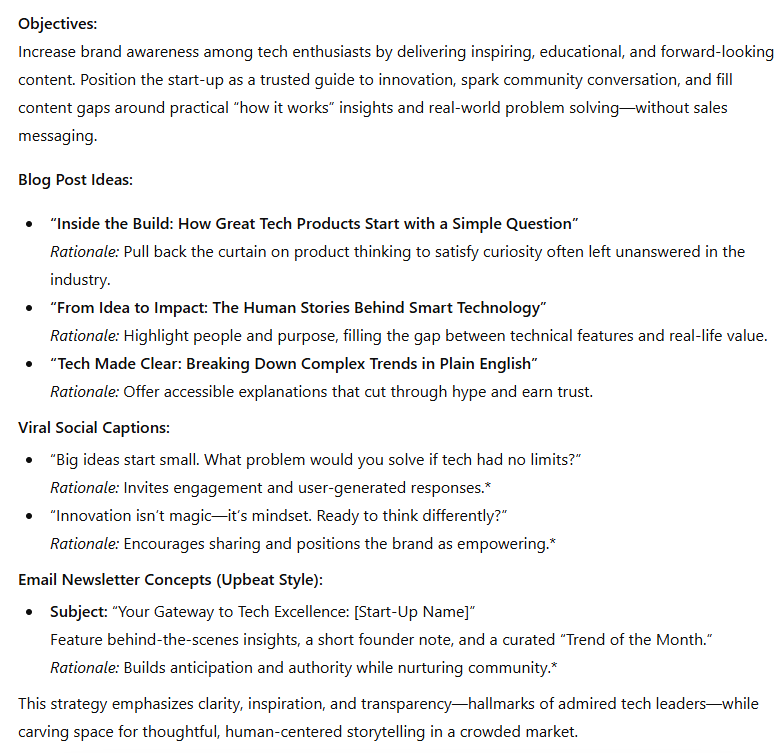
Acting as a content strategist, develop a 200-word content marketing strategy for a tech start-up to increase brand awareness among tech enthusiasts. The strategy should start with the objectives and then provide specific ideas for blog posts with captivating headlines, captions for viral social media posts, and concepts for email newsletter blasts. Provide a short rationale for each suggestion. Use this email subject line as an example of an upbeat and inviting style for the whole strategy: “Your Gateway to Tech Excellence: [tech start-up’s name].” The strategy should identify opportunities to fill content gaps in this niche without including sales-focused content. It should be informed by the content marketing of popular tech brands such as Google, Apple, and Amazon. At the same time, do not mention these brands in the content itself. The content strategy should avoid jargon while still being professional.
Here’s the resulting output that ChatGPT generated based on the above prompt:
Advanced ChatGPT prompting strategies
As you gain proficiency in composing thorough and explicit prompts like the example above, start using more advanced prompting strategies to get even more out of ChatGPT. In addition, this will contribute to the advancement and improvement of the generative AI tool.
Below are six strategies you might try.
1. Set custom instructions.
Your custom instructions can tell ChatGPT to adopt a particular tone when generating outputs or to focus its outputs on a specific field like dentistry or creative writing. Unlike providing these kinds of instructions in an individual conversation, setting custom instructions for your account might be useful if the majority of your conversations with ChatGPT adhere to specific parameters.
2. Use an AI prompt generator or ask ChatGPT to generate prompts.
While writing your own prompts from scratch is the best way to hone your skills, you might find it helpful to ask ChatGPT on occasion to generate prompts for you. In doing so, you can observe the tool in action and learn more about what makes a prompt effective and the kinds of outputs to expect.
Effective prompting often requires more than a single "send" button. Advanced workflows use the model's ability to maintain context and logic over time.
Multi-Turn Workflow: This involves a back-and-forth dialogue where you provide a system message ChatGPT uses to set the behavioral guardrails. By managing the state and providing feedback on each iteration, you prevent the model from losing focus.
Chain of Thought (CoT): This technique forces the model to "think out loud." By adding "Let’s think step-by-step" to your system prompt, the model processes complex instructions sequentially, which significantly reduces logical errors.
With each of these methods, be sure to evaluate the suitability of the outputs, as well as what qualities the prompts have that lead to desired outputs.
Watch this video to understand how ChatGPT can help you refine your questions:
3. Create your own prompt library.
Each time you create and use a ChatGPT prompt, consider saving it, along with the output, in your own files for later use. This allows you to o review and improve your own prompts for future projects, maintain a knowledge base, scale your GPT interactions, and create multiple versions of a prompt for different uses.
Interested in becoming a prompt engineer?
In your research into ChatGPT prompts, you may notice that prompt engineering, or the act of crafting inputs to optimize generative AI outputs, is emerging as a career field with jobs opening across industries. Employers are hiring people with skills in writing, data science, machine learning, and more to fine-tune interactions with AI tools and achieve their business goals. Try out Prompt Engineering for ChatGPT from Vanderbilt University to advance your skills today.
4. Ask ChatGPT to generate summaries of long conversations.
After chatting with ChatGPT over a series of prompts and follow-up prompts, you might find it useful to ask for a summary to retrieve important points rather than manually scrolling through the chat and reviewing it in its entirety.
5. Request outputs that represent multiple perspectives.
For some prompts, try asking ChatGPT to provide information and examples from different viewpoints on the given subject. Doing so can lead to a greater understanding of the subject, as well as reduced bias, informed decision-making, and more creativity.
6. Review and rate ChatGPT’s responses.
All of your interactions with ChatGPT can contribute to the tool’s continual improvement, as users’ chat histories can be used to train the model. Taking time to review and rate ChatGPT’s responses for quality and accuracy can lead to more significant upgrades. When users point out errors or provide suggestions, AI developers can collect more data to guide improvements and support accurate responses.
Common ChatGPT mistakes and how to fix them:
Here are the three most common prompting mistakes, and how to avoid or address them:
Not providing enough context: give your chatbot a persona (a copywriter, a medical student, a software engineer) or instructions in terms of length, structure (write 4 sentences about…; use a conversational tone).
Task overload: Avoid adding multiple requests into one prompt. Asl your requests one at a time, allowing the AI to focus all of its attention on each individual task.
Not iterating: You may need to send a few messages to guide the chatbot to the output you’re expecting. It’s normal to respond by stating that the output is strong, but you’d like the AI to review the tone, change the length, or add specific information.
Test and evaluate your prompts
Review the following questions when assessing your output:
1. Accuracy: Is the output factually correct?
2. Relevance: Does it address your prompt’s intent?
3. Conciseness: Does it contain unnecessary information?
4. Tone fit: Does the voice match the brand/project?
Practical ideas for shaping your career path
Explore career paths, assess your skills, and connect with resume guidance while browsing our Career Resources Hub. Or if you want to learn more about prompt engineering, check out these free resources:
Watch on YouTube: IBM AI Experts Reveal Prompt Engineering Secrets
Hear from an expert: Reimagining Work and Learning with AI: Expert Insights from Dr. Jules White
Whether you want to develop a new skill, get comfortable with an in-demand technology, or advance your abilities, keep growing with a Coursera Plus subscription. You’ll get access to over 10,000 flexible courses.



Frequently Asked Questions (FAQs)
Coursera Staff
编辑团队
Coursera 的编辑团队由经验丰富的专业编辑、作者和事实核查人员组成。我们的文章都经过深入研究和全面审核,以确保为任何主题提供值得信赖的信息和建议。我们深知,在您的教育或职业生涯中迈出下一步时可能...
此内容仅供参考。建议学生多做研究,确保所追求的课程和其他证书符合他们的个人、专业和财务目标。